
Chrome Extension
Speak. Translate. Type — automatically.
Talk in one language and watch your words land, translated, in any text field on the web — including fields inside iframes. Defaults to Urdu → English, with 39 languages built in, keyboard shortcuts, and a hands-free conversation mode.
Free and open-source.
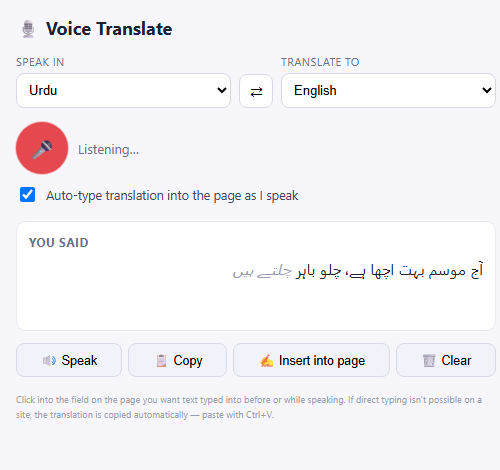
The side panel — pick your languages, tap the mic, and watch it transcribe and translate live.
How it works
Four steps, all happening live as you talk.
Speak
Click into any text field on a webpage, tap the mic, and start talking in your chosen language.
Transcribe
Your speech appears live under "You said" — gray italic while Chrome is still recognizing it.
Translate
Each chunk is translated in order in the background, in the language you picked to translate to.
Auto-type
With Auto-type on, the translation is typed straight into the field you clicked — no copy-paste needed. It goes where you are writing, not into the panel.
Features
Works across iframes
Comment boxes, chat widgets, and embedded forms often live inside nested iframes. Every frame reports its focused field, so typing lands in exactly the right place.
39 built-in languages
From Urdu, Hindi, Arabic and Tamil to Spanish, Japanese and Swahili. Pick what you speak and what you want it translated to — your choices are remembered, and you can save favourite language pairs.
Hear it back
Speak reads the translation aloud using your browser's built-in voices. Copy and Insert into page give you full control too.
Never leaves you empty-handed
If direct typing fails for any reason, the translation is copied to your clipboard automatically — just paste with Ctrl+V.
Reliable listening
Chrome's speech engine stops after a pause — the extension restarts it automatically, with retry and backoff if something goes wrong.
Correct ordering
Speech chunks are translated one at a time in a queue, so fast talking can't cause pieces to land out of order.
Conversation mode
Talking with someone in another language? Turn it on and the two languages swap after each turn, so the reply is ready to go with one more tap.
Keyboard shortcuts
Start and stop listening with Alt+Shift+V, undo or repeat the last typed phrase, or cancel a translation in progress. Every shortcut can be changed in Chrome.
Push-to-talk
Optional hold-to-talk mode: a Hold to talk button, or a key you choose like F9, listens only while you hold it. Or turn the mic on once and let it stay on, speaking only while you hold the key. Off by default.
Safe, precise typing
Never types into password or payment fields. Optionally type at your cursor, stick to one field, or press Enter for you. Undo removes only what the extension typed.
Works through bad connections
Cancel a translation with Esc, retry failures in one click, and if you go offline what you said is saved and translated when you are back.
Works offline, where Chrome allows
For languages Chrome supports on-device (such as English, Hindi, Spanish and Arabic), download the offline packs once and dictation and translation keep working with no internet. Other languages need a connection, and the panel tells you clearly.
Small touches
Voice commands in English (“new line”, “delete last word”), optional punctuation, a custom word list, gentle sounds, adjustable speaking speed, and a transcript download.
Good to know
A couple of honest limitations, straight up.
Google Docs, Sheets & Slides
These render their own canvas instead of a normal text field, so no extension can reliably type into them via standard methods. This extension tries harder and may work for short insertions — and if a direct attempt fails, the translation is copied to your clipboard automatically so you can paste it.
Chrome internal pages
Pages like the New Tab Page, chrome://settings, and the Chrome Web Store are special internal addresses that no extension is allowed to type into — a Chrome platform restriction, not a limitation of this extension.

Install Voice Translate
Add Voice Translate & Dictate to your browser in seconds.
Install Voice Translate Open Voice TranslateDeveloper installation
Not on the Chrome Web Store yet, or want the code straight from GitHub? Install it manually:
- Click Download zip below, then unzip the folder somewhere permanent — Chrome loads it from these files, so don't delete it later.
- Go to
chrome://extensions. - Turn on Developer mode (top right).
- Click Load unpacked and select the unzipped folder.
- Click the extension icon in your toolbar — it opens a side panel, ready to go.