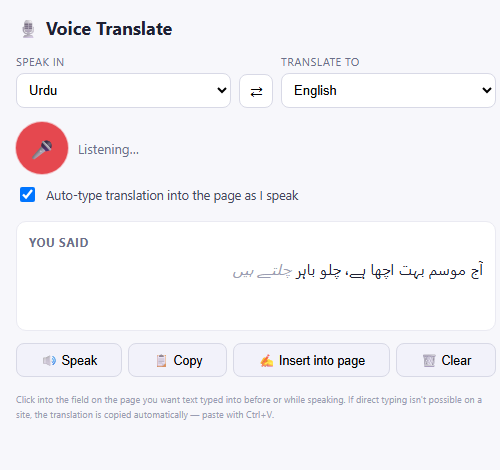
Voice Translate & Dictate does one thing: you speak, it transcribes what you said, translates it, and types the translation into whatever field you were using — even if that field is buried three iframes deep in a chat widget. The idea took an afternoon to explain. Getting it to actually work reliably took a lot longer, and almost none of the hard parts were where I expected them to be.
Speech recognition stops itself, and it won't tell you why
Chrome's SpeechRecognition API is genuinely good — it's the same engine behind native dictation — but it has one behavior that catches everyone off guard the first time: it stops listening on its own after a pause in speech, with no error, no event you can obviously hook into as "the user is done." If you don't handle this, your extension looks broken the moment someone takes a breath mid-sentence.
The fix isn't complicated once you know to look for it, but it took some trial and error to get right: listen for the end event, and if the user hasn't explicitly stopped, restart the recognizer automatically. The part that actually matters is the backoff. Restarting instantly, every time, sounds fine until the recognizer itself fails to initialize for some transient reason — then you're in a tight restart loop burning CPU and spamming the browser. A short, increasing delay between restart attempts (and rebuilding the recognizer object entirely if a restart itself throws) turned an occasionally-flaky feature into one that just quietly works.
The field you want to type into might not be in the page you're looking at
This one surprised me. A lot of real interfaces — comment boxes, embedded chat widgets, form builders — aren't in the page's main document at all. They're inside a nested <iframe>, sometimes more than one layer deep. A content script that only looks at the top-level frame will confidently type your translation into nothing, or into the wrong field, and give no indication anything went wrong.
The extension now injects into every frame on the page (all_frames: true in the manifest), and each frame independently reports when one of its own fields gets focused. The background service worker just remembers the most recent "this tab, this frame" pairing, so when it's time to insert text, it knows exactly which frame actually holds the cursor — not just which page the user is on.
Some sites will never let you type into them, and pretending otherwise is worse than admitting it
Google Docs, Sheets, and Slides don't use real text fields. They render the document themselves and capture keystrokes through an invisible, internal input that isn't part of the visible page — so there's no reliable DOM node to insert text into, no matter how the content script is written. Chrome's own internal pages (chrome://settings, the New Tab Page, the Web Store) are worse: no extension is allowed to inject into them at all. That's a platform rule, not a bug to route around.
The honest fix was to stop pretending. When direct typing fails, the extension copies the translation to the clipboard automatically and tells the user exactly that — "paste with Ctrl+V" — instead of silently doing nothing and letting them assume it's broken. A feature that fails loudly and gives you a fallback is far more trustworthy than one that fails silently and makes you doubt yourself.
Fast speech can arrive out of order if you're not careful
Each chunk of recognized speech gets sent off to be translated independently, which means the translation requests are asynchronous and racing each other. If someone talks quickly, there's no guarantee the translation for "chunk 2" comes back before "chunk 1" — and if you just append results as they arrive, you get scrambled output. The fix is a small in-order queue: chunks are translated one at a time, in the sequence they were spoken, with automatic retry (capped at three attempts) if a request drops. It's an unglamorous piece of infrastructure, but it's the difference between an extension that feels reliable and one that occasionally produces nonsense.
The takeaway
None of these problems showed up in the initial version, or in a quick demo. They showed up after real use — a comment box inside an iframe, a pause mid-sentence, a page that quietly refused input. Building something that handles speech and arbitrary websites means accepting that the platform will misbehave in specific, learnable ways, and that the job is mostly about noticing which failure you're looking at and building the right fallback for it.